Product Guide: Using Multiple Lab Accounts
Last updated: February 18, 2026
What’s New
You can now link multiple lab accounts to a single Team and manage them directly in the Dashboard.
If your Team has more than one lab account connected, you’ll see a step in the order flow where you can select the appropriate account.
Why This Matters
As organizations grow, lab relationships become more complex.
You may need to:
Use your own lab account for certain workflows
Use a Junction-managed account for others
Mix delegated and non-delegated arrangements
Support different billing rules by state
Separate service lines under different lab agreements
Work with labs that have geographic or business-unit constraints
Previously, this often required structural workarounds (like creating new Teams).
Now, all of this can be managed cleanly within a single Team.
What’s New
Multiple Lab Accounts Per Team
A Team can now be linked to one or more lab accounts.
If multiple accounts are available, you’ll see a step in the order flow where you select the appropriate lab account.
If only one account is linked, it’s automatically used.
Clear Account-Level Configuration
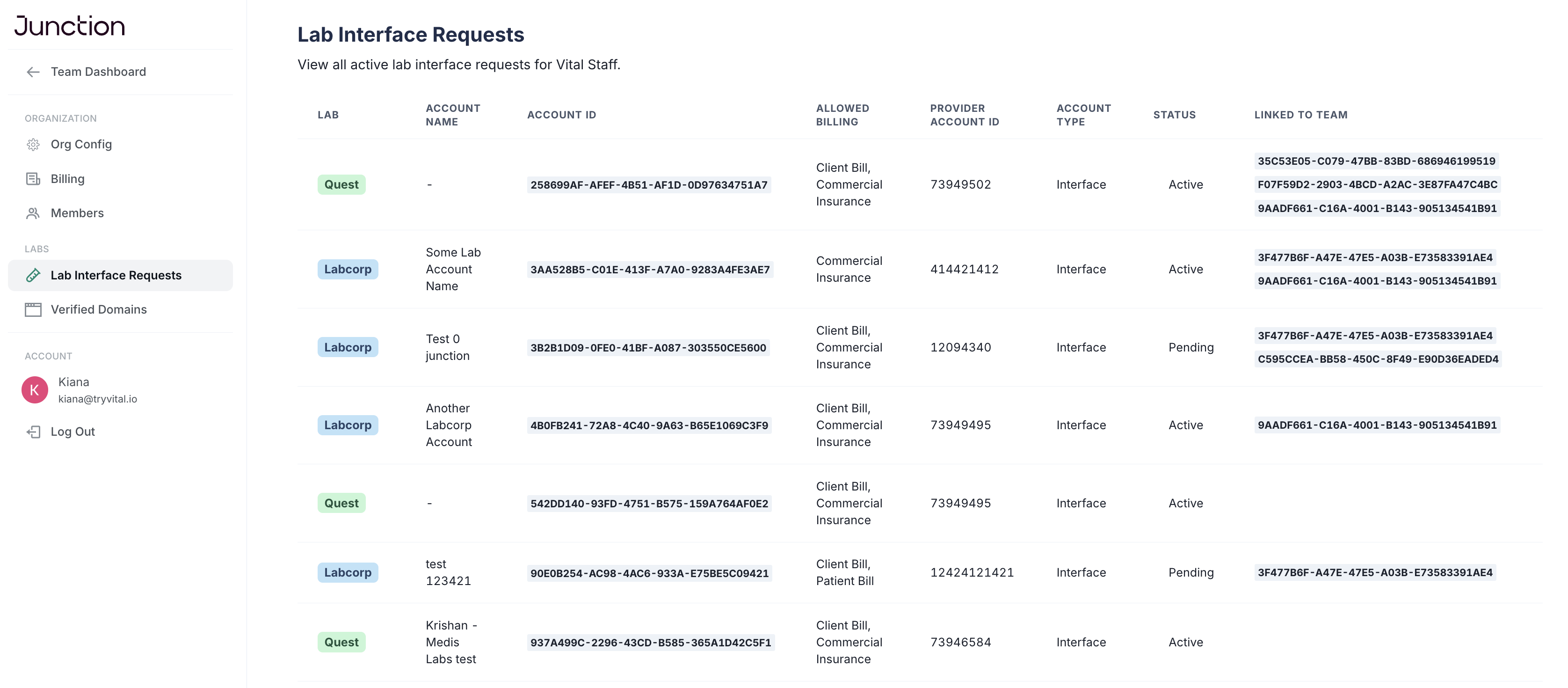
Each lab account has its own configuration, including:
Status (pending, active, suspended)
Delegation behavior
Supported billing types
Lab-specific constraints
Associated provider account details
This allows you to mix different lab setups within a single Team — safely and transparently.
Explicit Order & Result Attribution
Every order is tied to a specific lab account.
Results are reconciled to the same account used for ordering, helping prevent cross-account mix-ups and billing confusion.
If multiple accounts are available to your Team, we recommend explicitly including lab_account_id when creating orders via:
POST /v3/orderDashboard Visibility & Control
In the Dashboard, you can:
View all lab accounts linked to your Organization
See account status and basic configuration
Link or unlink accounts to specific Teams
Select the appropriate account during order creation
This makes your lab configuration explicit instead of hidden behind Team-level defaults.
When You Might Use This
Multi-account support is especially useful if you:
Operate multiple service lines under one Team
Use different lab billing models
Add new lab accounts as you grow
Need clearer operational and reconciliation boundaries
You can now scale without restructuring your account setup.
Managing Lab Accounts via API
Lab accounts can also be listed and managed via the Org Management API:
List lab accounts
Filter by status or Team
Update which Teams have access to an account
Full documentation:
Lab Accounts Overview: https://docs.junction.com/lab/overview/lab-accounts
Get Lab Accounts: https://docs.junction.com/api-reference/org-management/lab-accounts/get-lab-accounts
Update Lab Account Teams: https://docs.junction.com/api-reference/org-management/lab-accounts/update-lab-account-teams
Getting Started
If you’d like to:
Add additional lab accounts
Configure delegation or billing models
Link accounts to specific Teams
Contact your Customer Success Manager.